Is panning really unavailable during bounce and mixdown?

UsualNoise

New Member
Joined
Dec 25, 2025
Messages
3
Karma
0
Gear owned
Portastudio DP-32S
I've read the manual, read posts on this forum, and gotten Google's AI summary. All of this leads me to believe that you simply have no manual control of the left/right panning during bounce or mixdown recording. Am I correct on this?

For example, as soon as you enter "Mixdown/Mastering" you can only enter the MIXER screen BEFORE you hit record, not while recording. Similarly to the Bounce recording mode. I am dumbfounded at this limitation as I used to do that all the time using my old Korg D1600 MKII.

If this is really impossible I'll probably end up selling this unit and getting one that allows those finer manual controls during mixing. It is quite disheartening, as I love everything else about the unit. I was just finishing up a song with about 12 tracks and hit this wall of not being able to adjust the pan mid-master. Figured I'd post here and let the experts weigh in.
 
Not sure why you're having a problem, @UsualNoise.

Basic process (per the Owner Manual "2 - Quick Guide"):
1. Track in multitrack mode. When done tracking,

2. Press "Mix/Master" button, enter Mixing mode. Create then record the mix (OM: "Quick Guide/Mixing the Tracks"). When done mixing,

3. Press "Mix/Master" button, enter Mastering mode (OM: "Quick Guide/Mastering the Recording"). Apply mastering tools.

Done.

Similar for bouncing, but accessed while in multitrack mode (OM: "7 - Recording Functions/Bouncing Tracks")
 
Last edited:
All of this leads me to believe that you simply have no manual control of the left/right panning during bounce or mixdown recording. Am I correct on this?

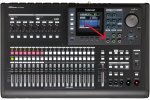
No, you are not correct. Press the Select button on the Track you want to adjust and turn the Pan control.

Also, some of what you said is confusing:

I was just finishing up a song with about 12 tracks and hit this wall of not being able to adjust the pan mid-master.
Mastering is for mastering a final mix. You cannot adjust any instrument balance in the Mastering section. You mix in Mixdown, and Master in Mastering.
 

Attachments

  • dp-32sd_p_top_s.JPG
    dp-32sd_p_top_s.JPG
    104.2 KB · Views: 0
I've recorded 3 albums worth of songs over the last 20 years or so via a Sony MD4 and Korg D1600 MKII, so I am pretty familiar with the process of recording, mixing, and mastering. My specific question was how to accomplish this:

1) I have 11 tracks recorded right now (on 1-6, 9/10-17/18), I want to create a master.
2) I want to change the pan or tracks 4 and 5 from -24 left to +24 right about halfway through the song.
3) I can't seem to access the mixing screen (which is the only place to adjust the pan of an individual track) after hitting "Record" on the Mixdown screen
4) I also can't access the mixing screen after hitting "Record" in Bounce mode.

Let me know if I've missed something obvious.

If I haven't missed something, my workaround will probably be sending those 2 tracks to my PC, using Audacity to create the desired panning effects and mixing to a stereo .wav file that I load back onto the Tascam to create the final mix.
 
AHHHH. I figured it out. (Immediately before seeing the last post before mine.) I didn't realize if you simply adjust the pan knob it "pops up" a little smaller mixing window. I kept trying to press "Mixer" and it wasn't working so I had no idea how to accomplish it.

I'm glad this wasn't really how the recording process worked on this thing, that would have been quite ridiculous. Thanks all!
 
I didn't realize if you simply adjust the pan knob it "pops up" a little smaller mixing window.
Yes, that feature probably isn't talked about as much as it should be. That also works for the EQ. So the only issue tends to be forgetting to Select the Track you want to adjust. It's very convenient to not have to access the Mixer screen for every little adjustment.
 

Members online

No members online now.