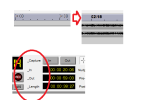
Hi, running MX-View 1.4 on Windows 10 or 11 was always sad to have a bad display of the rule time in EDIT Window of MX-View.
It seems there is a software bug in the calculation of the character size. I try a workarround using a different font and it works.
I decide to solv this issue and create a version 1.41 that can use the font you want.
My choice is "Arial Black" that give the better display.
I also modify the Transport Windows to better display some text. See the picture here enclosed. "_" is the only character thar permit to align text!
As I mention this is workarround because cannot debug and modify/adapt this old application.
If interested you can download there
 drive.google.com
In the archive MX-View 1.41.zip there is an Info_V141.txt file giving all informations to install and create the Fontsubstitution in the registry ( En and FR version). SImple to do.
If you need some more info, post in this thread.
You can identify the runnig version of MX-View in Help/About. version 1.41 display is "Ver 1.41". original was "Version 1.4"
Limitation running MX-View 1.4 or 1.41 on Windows 11: scrolling a window is impossible. Seems a bug of windows 11 as they modify a lot the way that manage scrolling bars. If some body have the solution ..
..
Happy to share with the community.
Best regards.
Hervé
It seems there is a software bug in the calculation of the character size. I try a workarround using a different font and it works.
I decide to solv this issue and create a version 1.41 that can use the font you want.
My choice is "Arial Black" that give the better display.
I also modify the Transport Windows to better display some text. See the picture here enclosed. "_" is the only character thar permit to align text!
As I mention this is workarround because cannot debug and modify/adapt this old application.
If interested you can download there
MX-2424 - Google Drive
drive.google.com
In the archive MX-View 1.41.zip there is an Info_V141.txt file giving all informations to install and create the Fontsubstitution in the registry ( En and FR version). SImple to do.
If you need some more info, post in this thread.
You can identify the runnig version of MX-View in Help/About. version 1.41 display is "Ver 1.41". original was "Version 1.4"
Limitation running MX-View 1.4 or 1.41 on Windows 11: scrolling a window is impossible. Seems a bug of windows 11 as they modify a lot the way that manage scrolling bars. If some body have the solution
..Happy to share with the community.
Best regards.
Hervé