Computer will not recognize Tascam US-16X08

Max Rottenberk

New Member
Joined
May 21, 2020
Messages
3
Karma
2
Gear owned
Tascam US-16X08
I just bought a used Tascam US-16x08 interface. I downloaded the software the goes along with it and it wont recognize the interface when its plugged in through the USB. The download said it included the drivers but it seems like it was the only the 16x08 software. I also downloaded the firmware it told me to download but when I run that it says " The supported device is not connected" So this has me thinking my entire computer just wont recognize the interface at all. Did I just buy a broken interface? It said it was working and in good condition. I'm using windows and use pro tools.
Someone help.
 
The download said it included the drivers but it seems like it was the only the 16x08 software

If you're not sure the drivers are installed, that's where you need to start troubleshooting.
 
How do I make sure the drivers are installed? Probably a dumb question, sorry.
 
  • Like
Reactions: -mjk-
No, that's not dumb at all! In the Windows device manager there is an option to update the driver. I usually start there, but often go looking for it on the manufacturer's site and I make sure to install the driver directly if it's available.

Finally, don't forget to reboot (I have, a number of times....). Sometimes, rebooting with the device unplugged, and then plugging it in after the machine finishes loading all apps and drivers will allow Windows to configure the new device.

Lastly, you an always use the device manager to delete the device and start over.

This stuff isn't always as easy as it would appear. In my case, I had to disable power management on all of my USB devices because after some idle time, they would stop functioning properly.
 
Last edited:
All I did just now was unplug the device from usb, then reboot it and let it sit for a minute before plugging it back in, and then it worked! Thank you for your help!
 
  • Like
Reactions: -mjk-
Fantastic! Time to make some music!
 
Having this same issue. Not sure what step to take next. The download said it included the drivers but it seems like it was the only the 16x08 software. I also downloaded the firmware it told me to download but when I run that it says " The supported device is not connected.” Tried rebooting my device plugging it in, unplugging it. I’m not sure how to find the drivers in my system device menu. Can you elaborate on how exactly to make sure I have the drivers in the system devices? Or what other possible steps I could take?
 
@gcdannemiller
First, check to make sure the "AUTO POWER SAVE" switch on the back of the interface is turned OFF. If it's on, turn it off & shut down the interface for a few minutes & turn the interface back on. Leave the "AUTO POWER SAVE" switch off because it just causes all kinds of problems. If that feature gets activated when your interface is idle for too long, it needs to be power cycled to come back on. It also tends to be glitchy afterwards.

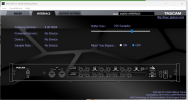
If your US-16x08 Settings Panel works, what Software and Firmware version does it say in the "Interface" tab?
Mine on Win 10 says-
Software Version: 4.00 0064
Firmware Version: 2.00 0022

If your firmware version is already 2.00 xxxx, then that's up to date.

If you do actually need to update it, and the firmware updater doesn't work properly, make sure your interface is turned on and close any programs (including the Tascam Settings Panel, antivirus/security software, and anything unnecessary running in the background) before running the firmware updater.

To check your driver info in the Windows Device Manager:
-Press Win+R to open the run box.
In the field titled "Open", type in the following:
devmgmt.msc

Then click "OK".
The Device Manager should pop up.

-In the Device Manager's top menu bar, select "View > Show hidden devices".

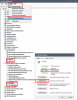
-Expand the "Sound, video and game controllers" section, and look for "US-16x08" & "US-16x08 MIDI".

-To view the driver version or check for updates, double-click "US-16x08" & "US-16x08 MIDI" and select "Update driver" in the "Driver" tab of the "US-16x08 Properties" window.
You might want to do the same for "MIDI IN" & MIDI OUT" in the "Software devices" section.
DV.png

If you have the US-16x08 turned on, but you don't see any entries for it in the "Sound, video and game controllers" section, or the entries are greyed-out, then either your interface isn't turned on, the "AUTO POWER SAVE" feature has kicked in, or there's likely something wrong with your installation.
If that's the case, then again, make sure the "AUTO POWER SAVE" is switched OFF, power off/unplug the interface, uninstall the Tascam software, reboot the PC, and reinstall the Tascam software.

Good luck.

 
Last edited:
I am having this issue suddenly. I've had this unit for a few years and has worked flawlessly...till about couple weeks ago when it just suddenly stopped connecting to the laptop(s). I've used 2-3 different laptops to record when it was working with Windows 11 and 10. It doesn't connect to any now. I've reinstalled all drivers and all the other usual suspects to troubleshoot including uninstalling devices from the device manager panel etc etc. I've changed the USB cable and tested with at least 3-4 and all of them work fine with other devices. I'm getting a bit desperate so thought to turn here. Any thoughts? BTW, while I am not a big computer genius, I am well versed. So this is baffling. that one day it works and the next day kaput. Yes, it does power on.
 

Attachments

  • Screenshot 2026-02-14 162426.png
    Screenshot 2026-02-14 162426.png
    248 KB · Views: 1
  • Like
Reactions: -mjk-
When I have flaky connections like that, I got into the Device Manager in Control Panel and I delete the device from the list. You may have to view hidden devices to see all of them as there may be multiple entries. That forces the computer to re-register the device as you connect it again.
 
MJK - thanks for the response. I have already tried that as well. Everything else works/connects except the Tascam unit. I think the USB part of the interface is somehow fried. I tried looking online to see if parts are available, but seems that it was designed specifically for 16x08 and not readily available. Of course Tascam will not respond to my emails/calls. They probably don't even look at these forums. Looking online, it seems quite a few folks have reported the same but some seem to have got lucky that changing the power brick or usb wire and other tricks have worked. I guess just my luck. And my extended warranty also juuuust expired 2 months before the breakdown.
 

New threads

Members online

No members online now.